Friday, 14 June 2013

Design Change due to iterations

Iteration Document
Base Mechanics before iterations
Player
Players will use the WASD keys and the mouse to move the avatar. It is important for players to walk at a slow speed as they will need to take their time moving around the level to avoid the AI. Players will also have the ability to run.  This gives them a chance when they are spotted by the AI to get away quickly as the AI will begin to chase them.  
There are 3 different types of objects the player can interact with in the game. The first is a puzzle object which the player must click on to access the puzzle they need to complete, in order to progress. The second is a cupboard object; these are the objects the player can hide within to keep out of sight of the wolf.  The third are door objects. Players will be responsible of opening and closing doors themselves in the game. This is so that they can choose to leave a door open for a quick escape from the wolf or close the door to put space between them and the wolf.
The player has no health and no way to defend themselves against an attack. The only chance they have is to avoid the AI. If they are caught by the wolf they die instantly. There will be a checkpoint in each of the puzzle rooms so that the players’ progress through the game is not lost.   
AI
The AI will chase the player. This will force the player to move through the level and into the puzzle rooms. The most AIs in the level at one time will be two.  This is so that the player will not become overwhelmed and trapped in a part of the level with no way to safely get past.
AIs attack with a charge. Once the player has been spotted they will howl and begin to sprint towards them, this is the charge attack. The AI will roam the hallways in search of the player moving slowly from room to room. Once the player is spotted they begin the charge attack.   


Progression mechanics 
In the level there will be 3 chess based puzzles. Players must solve these puzzles to unlock the door that leads to the next section of the level.


‘Chess puzzle in ‘Alice Madness Returns’

The puzzle will be set on a chess board. The player will control one piece on the board. Two types of AI pieces will also be on the board. One AI piece will simply take up a square blocking the player’s path. The other will move across the board after the player has made their move. If the player is on a square the AI is about to move on and the two pieces collide the puzzle will reset.  Players will have a limited amount of steps they can use to get from the start position to the goal position marked on the board
Scare mechanics
To create the atmosphere needed for a horror game I am going to use two things to my advantage. The first thing that I am going to use is creepy bass heavy music track that will build the suspense in the level. I will use sounds such as wolf howls, stormy winds and crashes every now and then to make the player jump.
The second thing that I am going to use is trigger events. An example of this used within the game would be:
1.      Player is in a long corridor
2.      At the end of the corridor is a light that is slightly flickering
3.      Once the player is a few feet away the light quickly flickers off
4.      After a few moments the light turns back on and a shadow that wasn’t on the wall before is now on the wall.
5.      The shadow quickly darts around the corner.

Iterations
As development began on the game, it became abundantly clear that mechanics that worked well on paper wasn’t quite as successful in game. Major iterations include:

1.      No more chess based puzzles – Although I fully coded and created all assets for the chess based puzzle (https://www.youtube.com/watch?v=19UuQGMDScA) I decided that I needed to take this form of puzzle away. This was because it took the player completely out of the environment I had worked so hard to create. Players became a lot more at ease after the puzzle and this affected the immersive atmosphere a great deal.  I need a puzzle that that can be completed in the same environment where the rest of the game takes place. 

The puzzle element is now in the fact that players must work out that they have to turn on light in order to unlock the door. This encourages a player to explore and keeps them in the same eerie environment.
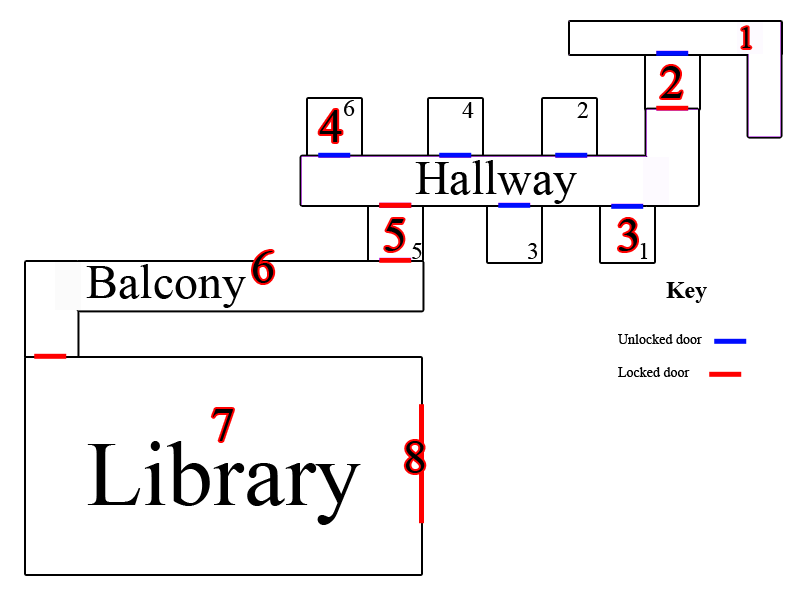
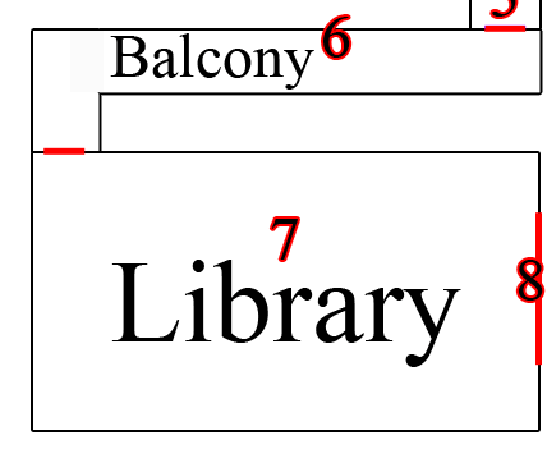
'Old Level Design'
2.      Level Design Change - With the change of the puzzle element in the game I needed to change the level slightly. This was due to the fact I had spent all my allocated time coding the chess based puzzle and on top of that had to code and source assets for the new puzzle system. This meant I needed to cut the size of the level in order to fit in with my schedule and make the project manageable again. A level downsize wouldn’t affect the quality of the game for the player, but would decrease my workload drastically without a negative consequence, allowing time to make the changes needed to improve the game experience. I keep the basic structure that the level needed i.e. long corridors with rooms branching off them so that the atmosphere wouldn’t be affected. The major change I made was to make room fewer and smaller.
   
'New Level Design'

3.      Examine Mechanic – I really wanted the environment to tell a story. I have created old decaying textures on all assets that show the history and abandonment in the level. I felt that this factor could be amplified slightly to encourage players to embrace the atmosphere more and turned into a game feature. I have created a new mechanic in which players may examine certain assets and details in the game. The crosshair changes when a player rollovers certain objects letting them known that on a mouse click they may learn more about the object really allowing the environment to tell a story as well as driving the narrative of the game forward.    

4.      EXAMINE MECHANIC UPDATE – I have now fully implemented the new examine feature in the game. It work wells however due to my lack of coding experience, it isn’t as effective as it should be. I have been able to code it so that if a players crosshair rolls over an object that can be examined, the crosshair changes to the ‘examine icon’. However the issue I am having is setting the crosshair so that it only changes a certain distance from an object. Right now, players can be standing across the room from an examinable object and not even have it in eyesight yet; despite this the crosshair would still change if it detected the rollover. This has become quite an eyesore with the crosshair changing every second as a player explores the environment. What I have decided to do is to condense down what a player can examine, limiting it to writings on the wall. This mechanic works a lot better like this with the game in its current state as I can place examinable text in places where the crosshair changing wouldn’t become a nuisance.

Final mechanics after iterations

Player
Players will use the WASD keys and the mouse to move the avatar. It is important for players to walk at a slow speed as they will need to take their time moving around the level to avoid the AI. Players will also have the ability to run.  This gives them a chance when they are spotted by the AI to get away quickly as the AI will begin to chase them.  
Players have the ability to examine certain details within the level such as writing scribbled across the walls. This not only allows the narrative to unfold, but also is a key way of guiding a player on what they must do in order to progress. For example the player is in a locked room, writing on the wall informs the player that ‘light is the key’, once the player turns on the lights in the room the door unlocks. 
Players can interact with doors in the game. By clicking on a door they are able to open and close it. Certain doors will be locked in the level; to unlock them players must find a set number of lights and turn them on. The crosshair changes within the game to let and player known if they can interact or examine an object.  Players will be responsible of opening and closing doors themselves in the game. This is so that they can choose to leave a door open for a quick escape from the wolf or close the door to put space between them and the wolf.
The player has no health and no way to defend themselves against an attack. The only chance they have is to avoid the AI. If they are caught by the wolf they die instantly. There will be checkpoints placed throughout the level so if a player does die and chooses to retry they won’t have to constantly start at the beginning of the level. This will encourage players to try again with the peace of mind that not all their progress has been lost.
AI
The AI will chase the player. This will force the player to move through the level and into the puzzle rooms. The most AIs in the level at one time will be two.  This is so that the player will not become overwhelmed and trapped in a part of the level with no way to safely get past.

AIs attack with a charge. Once the player has been spotted they will begin to sprint towards them, this is the charge attack. The AI will roam the hallways in search of the player moving slowly from room to room. Once the player is spotted they begin the charge attack.   

Thursday, 7 March 2013

Game update

Main Level
http://www.youtube.com/watch?v=PIkrD7_Y8hs&feature=youtu.be

The main scene has changed quite drastically since my last blog post. Basic textures have now been added and a scare trigger is now in the game. I have also changed the model of the door with the correct pivot point so it opens correctly. I need to tidy up the collision on the door because at the moment it is a little buggy. Another thing I have done is added in locked door code. the player will longer be able to walk through any door they want and will have to complete the puzzle in the puzzle rooms in order to escape.

Puzzle Level


http://www.youtube.com/watch?v=19UuQGMDScA

The puzzle scene has now been added. The player snaps and can also only move a limited amount of steps. I have started play testing puzzles to refine this part of the game. I need to add the UI so that it displays the amount of steps a player starts with and also work out the math so that the player snaps directly to the centre of each square.   

Saturday, 9 February 2013

Design update

Grimm Dreams
‘Don’t be afraid of the Big Bad Wolf’
The game will be developed in unity. It is a 3d survival horror game.
Core game mechanics
Player
Players will use the WASD keys and the mouse to move the avatar. It is important for players to walk at a slow speed as they will need to take their time moving around the level to avoid the AI. Players will also have the ability to run.  This gives them a chance when they are spotted by the AI to get away quickly as the AI will begin to chase them.  
There are 3 different types of objects the player can interact with in the game. The first is a puzzle object which the player must click on to access the puzzle they need to complete, in order to progress. The second is a cupboard object; these are the objects the player can hide within to keep out of sight of the wolf.  The third are door objects. Players will be responsible of opening and closing doors themselves in the game. This is so that they can choose to leave a door open for a quick escape from the wolf or close the door to put space between them and the wolf.
The player has no health and no way to defend themselves against an attack. The only chance they have is to avoid the AI. If they are caught by the wolf they die instantly. There will be a checkpoint in each of the puzzle rooms so that the players’ progress through the game is not lost.   
AI
The AI will chase the player. This will force the player to move through the level and into the puzzle rooms. The most AIs in the level at one time will be two.  This is so that the player will not become overwhelmed and trapped in a part of the level with no way to safely get past.
AIs attack with a charge. Once the player has been spotted they will howl and begin to sprint towards them, this is the charge attack. The AI will roam the hallways in search of the player moving slowly from room to room. Once the player is spotted they begin the charge attack.  

Progression mechanics 
In the level there will be 3 chess based puzzles. Players must solve these puzzles to unlock the door that leads to the next section of the level.


‘Chess puzzle in ‘Alice Madness Returns’

The puzzle will be set on a chess board. The player will control one piece on the board. Two types of AI pieces will also be on the board. One AI piece will simply take up a square blocking the player’s path. The other will move across the board after the player has made their move. If the player is on a square the AI is about to move on and the two pieces collide the puzzle will reset.  Players will have a limited amount of steps they can use to get from the start position to the goal position marked on the board

Scare mechanics
To create the atmosphere needed for a horror game I am going to use two things to my advantage. The first thing that I am going to use is creepy bass heavy music track that will build the suspense in the level. I will use sounds such as wolf howls, stormy winds and crashes every now and then to make the player jump.
The second thing that I am going to use is trigger events. An example of this used within the game would be:
1.      Player is in a long corridor
2.      At the end of the corridor is a light that is slightly flickering
3.      Once the player is a few feet away the light quickly flickers off
4.      After a few moments the light turns back on and a shadow that wasn’t on the wall before is now on the wall.
5.      The shadow quickly darts around the corner.
Environment Research
To add realism to the environment I decided to look on Google at abandoned asylums. This was because due to their history, asylums instantly have that unsettling factor that a good survival horror game requires to be successful. If the environment is spooky and unnerving the mechanics was thrive  creating a successful game experience.


The rubble and peeling wallpaper really spoke to me. It shows age and intensifies the sense of abandonment in the once active building. Long corridors and the fact of not knowing what room branches off this corridor really would add to the atmosphere when walking around a building like this.  

Lone objects placed in large rooms allow the environment to tell the story of it history. The way the assets are place, ready to be used yet decayed due to abandonment adds to the creepy atmosphere.


Random scribbles across the walls and children’s toys thrown about get me asking questions. Who was once here? What was this placed used for? Does this eerie environment have a sense of innocence that I’m yet to discover?  If I can get the player asking these questions in my environment then I would have created an immersive game.

The Hows and Whys of Level Design
By Sjoerd De Jong


Now that I’m at the stage to start designing my level i re read ‘the how’s and whys of level design by sjoerd de jong’. Here is a breakdown of the notes I took whilst reading this book 


Notes

‘A world where event take place’
Give reason to exist.
Think about the story
Think about the goal and how the player achieves this.
Rules to the world
How will the environment award the player?
When designing…
  • Don’t break the law
  • Get permission
  • Be careful!

Colour affects mood + emotions
Colours give a sense of identity to the environment
THINK VISUALLY!!!
Colour and mood can help convey info to the player
How do you want the player to feel?
Lighting can affect mood
Use complimentary colours to draw player’s eye
Use tricks of colour/light to draw player to part of the environment
Believability comes from research.
An object can be many things (cover from gun fire etc)
  1. Plan environment
  2. think of story
  3. gather resources/research
  4. think about mood
  5. aim to immerse  player into the world

When designing my level i will keep these notes in mind in order to design the best level I can for the player.
Level design
1.      The player starts here. They encounter the wolf and escape via the unlocked door
2.      The player encounters their first chess based puzzle that they must solve it to unlock the next door
3.      The player discovers a riddle, the solution is in room 6 (point 4).
4.      The player finds a switch which they pull to unlock door 5.
5.       The player encounters a riddle ‘The Key to freedom always lies in the heart’. The answer is located in the chest of a torn open teddy bear.
6.      The player encounters their second chess based puzzle, once completed the door behind them swings open as the wolf bursts through and they must run to the next door.
7.         Once in library the player must find and collect 3 fairy tale books; three little pigs, the wolf and the seven young kids and finally little red riding hood. They will be provided clues to where the books are located within the library.
8.      The player must place the books into the allotted square engraved into the door. Once this is done they escape the building. 

In the first section of the game that I will refer to as ‘Hallway’, the player will experience the constant pressure to move forward. This is because in this section of the game they will be confronted more by the enemy (The Wolf). The atmosphere created will make the player feel pressured to move forward to avoid The Wolf as I will use sounds to give the illusion that the wolf is right behind them. I want the player to become fully immersed in the game almost instantly, and adding this pressure on them will achieve that as they will have to be alert. Hallway will have a haunting but abstract feel as the player progresses through this environment. I indent for this atmosphere to continue throughout the entirety of the game.
In the second section of the game or ‘Library’ the pressure will ease off the player as the illusion of The Wolf being right behind them will stop. The aim of this change of pace is not only to keep the player interested, but also to increase tension and excitement thus improving player experience.  The environment changes from interior to exterior back to interior, this is so that the game doesn’t become too repetitive and boring to the player. The change in environment also suits the pace change within the game as it allows ‘cheap shocks’ to be achieved more effectively as the tension is higher.       
Appendix

A well needed update...

 The game so far...

http://www.youtube.com/watch?v=Ih8ltj15F1A&feature=youtu.be 

At the moment i am on schedule with my Gantt chart.  

Gantt Chart

Here is a screen shot of my Gantt Chart for this project.

Red is the day the task is started.
Yellow are the days in which the tasks are in progress.
Green is the day in which the task must be completed by.

Sunday, 2 December 2012

GreyBox

I used the level map from my propsal to build the level in CAD software Google SketchUp


I have created the first greybox of the level. i used google sketchup to create the outer walls of the level and then imported the file into 3ds maxs to make aesthetic changes to the level i.e adding a balcony to the library. 

  
Over the next few days i will import the level into unity and begin adding assets for the full grey box to be complete.


Design Clarity and Changes

Upon receiving  feedback on my initial dissertation proposal I have decided to make the following changes:


  • The will now be 1st person. Although i still feel that a 3rd person camera would create a better aesthetic atmosphere, the player will become more immersed in gameplay from a 1st person viewpoint. In my feedback there were worries that i was undertaking too much with this project. By having the game 1st person  it cuts out 3d modelling the main character and animating the character. i will also save time on having to code a 3rd person camera in unity as a 1st person character controller is built in. 
  • As i am creating quite a large environment that will be made of up of a variety of asset, it was also pointed out that this will be a large undertaking in the time frame i have. to solve this i have decided that i will make some of the assets myself, but i will largely source 3rd party assets from websites like http://thefree3dmodels.com/stuff/furniture/leather_chair/12-1-0-3560. this will cut the work load down considerably. this allows me alot more time to iterate gameplay and implement new features if necessary.    
  • My project timeline is a bit vague on what tasks i will be undertaking during each sprint. i have decided to completely revise this.I need to refine my project timeline into 1/2 week sprints so i can break down the workload into tasks so i stay on track. I dont want to fall behind in development because my timeline is unspecified. i could easily fall into the trap of thinking 'i have time...'  just because I haven't set myself consistent milestones to keep myself disciplined and on track.